
Vastorn OTS Extension
Save Once, Fill Everywhere
Stop typing the same information repeatedly. Save your details once and fill any form with a single click.
Powerful Features
Save Once, Use Everywhere
Store your information once and reuse it across unlimited forms. No more repetitive typing!
One-Click Fill
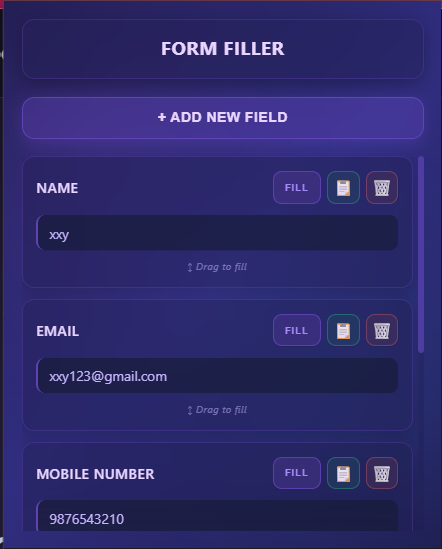
Fill button next to each saved item. Click once and watch your form populate automatically.
Drag & Drop
Intuitive drag-and-drop functionality. Simply drag your saved data to any input field.
Quick Copy
Copy button for manual pasting. Perfect for when you need more control over your data.
Custom Fields
Add any key-value pair with the + button. Customize your saved data to match your needs.
Universal Compatibility
Works with Google Forms, Excel forms, job applications, and any web form you encounter.
Secure Storage
Your data is safely stored in Google Cloud with 100KB free storage. Encrypted and secure.
Privacy First
Your data stays yours. We never share or sell your information to third parties.
How to Use
Install the Extension
Click the "Install Extension" button and add OTS to your Chrome browser. It takes just seconds!
Open the Extension
Click the OTS icon in your Chrome toolbar to open the extension popup.
Add Your Data
Click the + button to add key-value pairs. For example: Name → John Doe, Email → john@example.com
Fill Forms
When you encounter a form, open the extension and click the Fill button next to each data item to populate matching fields.
Drag & Drop
Alternatively, drag any saved data directly from the extension to the form field where you want it.
Copy Data
Use the copy button next to any data item to copy it to your clipboard for manual pasting.
Frequently Asked Questions
Your data is securely stored in Google Cloud Storage. We provide 100KB of free storage, which is more than enough for hundreds of form fields. Your data is encrypted and only accessible by you.
Absolutely! We use industry-standard encryption to protect your data. Your information is stored securely in Google Cloud with enterprise-grade security measures. We never share or sell your data to third parties.
OTS Extension works with all websites and web forms! Whether it's Google Forms, Excel online forms, job applications, registration forms, or any other web form, our extension can help you fill them quickly and easily.
You get 100KB of free storage with Google Cloud. This is enough to store hundreds of key-value pairs. For reference, 100KB can hold approximately 500-1000 typical form fields depending on the length of your data.
Currently, OTS Extension is available for Google Chrome and all Chromium-based browsers (like Microsoft Edge, Brave, and Opera). We're working on support for other browsers in the future.
Yes! You can export all your saved data as a backup. Simply open the extension settings and use the export feature to download your data as a JSON file. You can also import it back anytime.
You have full control over your data. You can delete individual items by clicking the delete button next to each entry, or clear all data at once from the extension settings panel. Deleted data is permanently removed from Google Cloud.
Yes! Your data is cached locally in your browser, so you can access and use it even when you're offline. Changes will sync to Google Cloud when you're back online.
Privacy & Security
Your privacy is our priority. We're committed to protecting your data with enterprise-grade security while giving you complete control.
For more details touch here 🗃️
What We Collect
We only collect data you explicitly save:
- Your saved key-value pairs
- Extension preferences
- Optional anonymous usage stats
Secure Storage
Your data is protected with:
- 256-bit AES encryption
- Secure HTTPS connections
- Google Cloud infrastructure
- Regular security audits
Zero Data Sharing
Your data belongs to you alone:
- No selling to third parties
- No marketing partnerships
- No social media integration
- No advertising networks
Your Control
Full control over your data:
- View anytime through extension
- Edit or update instantly
- Delete individual items
- Export as backup (JSON)
- Import from backup
No Tracking
We respect your browsing privacy:
- No cookies or trackers
- No behavior monitoring
- No analytics by default
- Opt-in only for improvements
Data Retention
Your data lifecycle:
- Stored while you use extension
- Deleted within 30 days of uninstall
- Immediate deletion on request
- Offline access with local cache
Browser Support
Compatible with:
- Google Chrome
- Microsoft Edge
- Brave Browser
- Opera Browser
Children's Safety
Protecting young users:
- Not directed to children under 13
- No knowingly collected child data
- Immediate removal if reported
- COPPA compliant
Questions or Concerns?
We're here to help with any privacy questions or data requests.
Contact Us
Get in Touch
Have questions? We're here to help! Reach out to us and we'll get back to you as soon as possible.
📧 Email: helpvastorn@gmail.com
💬 Response Time: Usually within 24 hours
🌍 Company: Vastorn